
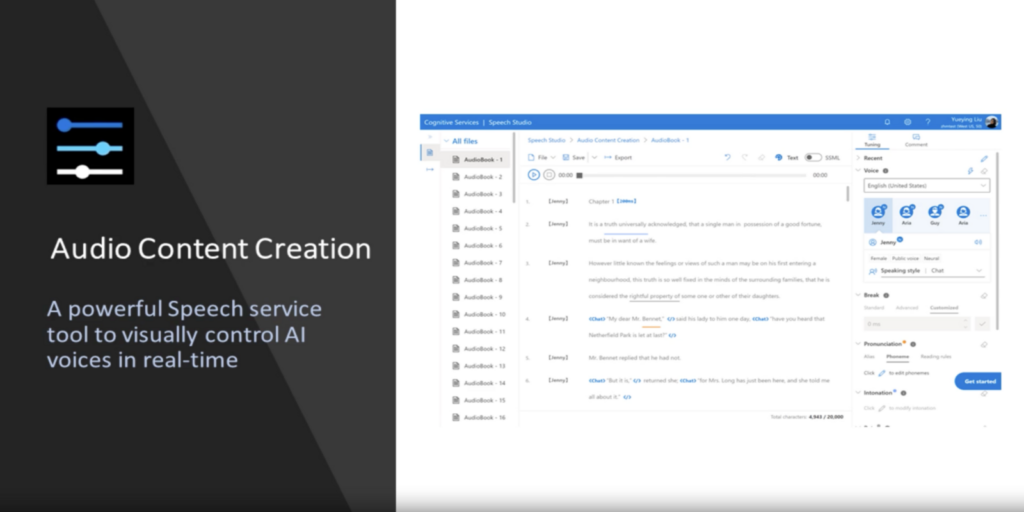
In today’s world, text-to-speech technology is increasingly crucial for businesses to develop engaging and innovative applications. Microsoft’s Speech Studio empowers businesses to seamlessly integrate advanced speech-related features into their applications, regardless of their coding experience.
What is Speech Studio?
Speech Studio, powered by Azure Cognitive Services Speech service, offers developers a comprehensive set of tools for creating projects with advanced speech-related capabilities. These include real-time speech-to-text, custom speech recognition models, pronunciation assessment, voice gallery, custom voice, audio content creation, custom keyword, and custom commands. With these features, Speech Studio enhances speech accuracy and naturalness in applications, delivering an intuitive and seamless user experience. Incorporate text-to-speech effortlessly.
How to Use Speech Studio?
Using Speech Studio is incredibly easy and user-friendly, with no coding experience required. The tool provides a no-code approach for creating projects, enabling developers to get started right away. Here are the simple steps to get started with Speech Studio:
- Sign up for the Azure Cognitive Services Speech service
- Create a new Speech Studio project
- Select the features you want to incorporate in your application
- Customize the features to meet your requirements
- Integrate the features into your application
For example, if you want to add speech-to-text functionality to your application, simply select the speech-to-text feature, choose the language and dialect, and start transcribing speech. You can also create a custom speech model to handle domain-specific terminology, background noise, and accents for even greater accuracy.
If you want to add text-to-speech functionality, you can choose from over 400 voices across 140 languages and dialects. You can even create a custom voice to differentiate your brand and use various speaking styles to convey emotions in your spoken content.
Speech Studio also offers a voice assistant feature that allows you to add a conversational interface to your application, enabling users to activate and control your product using voice commands.
Key Features
Speech Studio offers a wide range of key features and benefits that make it an essential tool for businesses looking to incorporate advanced speech-related features into their applications. Here are some of the key features and benefits of Speech Studio:
Speech-to-Text
Quickly and accurately transcribe speech in more than 100 languages and dialects, with the ability to create custom speech recognition models to handle domain-specific terminology, background noise, and accents.
Text-to-Speech
Build apps and services that speak naturally with more than 400 voices across 140 languages and dialects. Customize voices to differentiate your brand and use various speaking styles to bring a sense of emotion to your spoken content.
Voice Assistant
Enrich your app or experience with a conversational interface to activate and control your product. Users can interact with your application through voice commands, providing an intuitive and seamless user experience.
Pronunciation Assessment
Evaluate a user’s pronunciation of specific words or phrases to provide feedback on accuracy and fluency. This feature is especially useful for language learning applications.
Custom Keyword and Custom Commands
Create custom commands and keywords that trigger specific actions in your application, providing users with a more personalized and efficient experience.
Benefits:
Easy to Use
With its no-code approach, Speech Studio is easy to use, even for non-developers.
Scalable
Speech Studio is highly scalable, making it suitable for businesses of all sizes.
Accuracy
The ability to create custom speech recognition models ensures high accuracy even in noisy and complex environments.
Personalization
The ability to create custom voices, commands, and keywords allows for a personalized and engaging user experience.
Integration
Speech Studio can be easily integrated with other Azure services, making it a powerful tool for businesses that rely on Azure for their operations.
Speech Studio is a powerful tool that enables developers to create engaging and innovative applications with advanced speech-related features. With its no-code approach, Speech Studio makes it easy for developers and non-developers alike to add speech features to their applications. So why not give Speech Studio a try and take your applications to the next level?